
For the last few weeks I have been looking at ways to use machine learning to develop a more reliable detection algorithm for seizures or falls. This is likely to end up being a Neural Network, because these are very computing intensive things to train initially, but can be evaluated on lower power devices (such as an Android phone I hope!).
So I decided to get myself a new fairly powerful computer as a birthday present to train the neural network with the large amount of data I will need. I was lazy and bought a complete computer rather than a pile of bits, because someone sold ones that came with Linux pre-installed so I wanted to support them. But it didn’t have a dedicated graphics card in it, and I need a medium to high end NVIDIA graphics card to train the network.
So I went looking around for an NVIDIA GTX 1050Ti graphics card, and found a few on Ebay that looked extremely good value (with hindsight, suspiciously good value!), so I ordered it.
Eventually it arrived off the slow boat from china and it installed in the computer ok and displayed the screen using the Ubuntu Linux supplied drivers – so far so good…..
But to run the neural network (tensorflow-gpu), I need the NVIDIA CUDA library installing, and this installs the more up to date drivers for the card. When these drivers were installed, it wouldn’t work, reporting that my hardware was not compatible with the driver, but it should be……
I assumed it was my fault, because I’d heard reports of getting NVIDIA drivers to work on Linux is a bit of a pain, and if you don’t follow the instructions precisely it can go horribly wrong – so I re-installed the operating system and tried again – same effect. In fact I spent a few evenings this week reinstalling operating systems and drivers in different combinations – but all gave the same result.
I had heard that counterfeit cards exist, so I decided to investigate….All the software reports the card correctly, and the label on the card looks correct:

so I resorted to pulling it apart to look at the actual GPU chip itself…
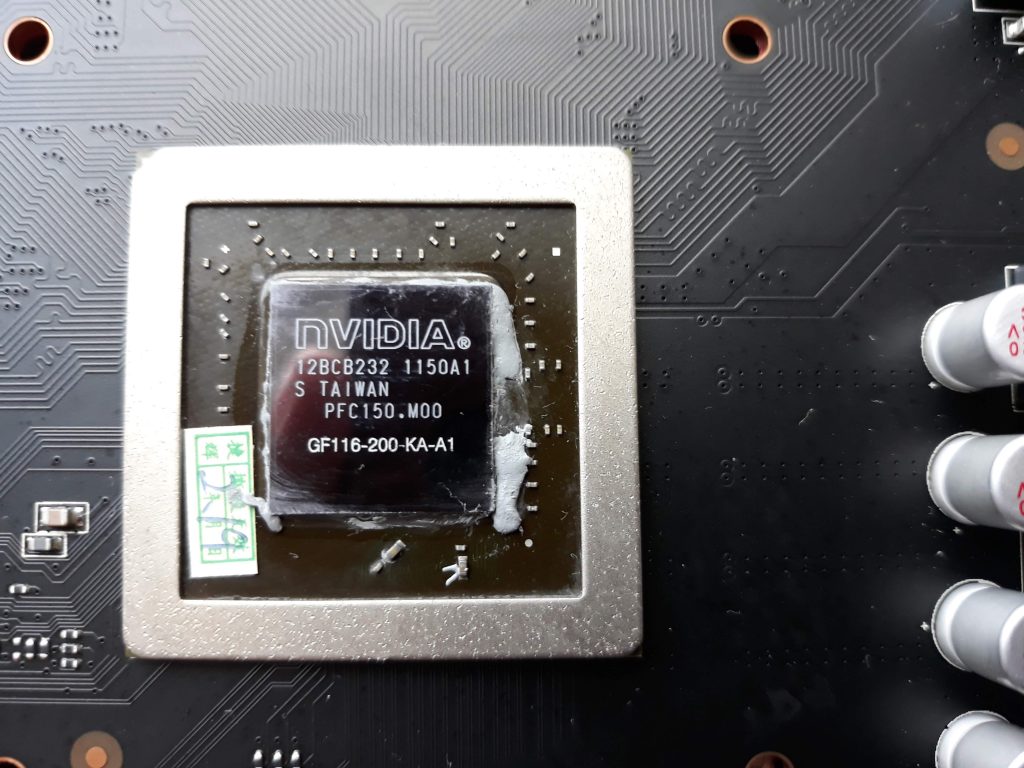
…And there was the problem. A GTX 1050 Ti card should have a GP107 chip in it, but this one is a GF116. A bit of googling did not find that precise model, but a GF116-250-KA-A1 (rather than the -200- shown above) was used in the GT400 series cards from 2010.
So the card I have got looks like an old model graphics card that has been re-labelled and had its software modified to report it as a modern(ish) GTX1050Ti card.
I have complained to the seller and Ebay so will see where I get, but I think I’ll have to buy one that looks more like the right price next time!