
Release of V4.3 of OpenSeizureDetector on Google Play Store

Version 4.3.x of the OpenSeizureDetector Android App is now available for all users on the Google Play Store. The two changes are:

  • Improvements to the ‘Data Sharing’ screen so that events are grouped so that all events within a 3 minute period are treated as a single event, so you only have to edit it once (the other events in the group are updated with the same information when you edit it). The idea of this is to make reporting seizures easier as you only need to edit one event rather than every alarm and warning during the seizure.
  • Updated to target Android 15 (this is a requirement of Google Play Store). I think it is working ok, but some of the screen layouts seem to have changed a bit.

Please report any issues on our bug tracker at https://github.com/OpenSeizureDetector/Android_Pebble_SD/issues or email graham@openseizuredetector.org.uk.

Thanks

Graham (graham@openseizuredetector.org.uk)
Data Sharing – Grouping Events for Easier Editing

Those of you who use our Data Sharing system to contribute data to the Open Seizure Database will know that it can be a bit tedious to update every event (alarm or warning) to say if it was a real seizure or a false alarm.

To overcome this I have been intending for some time to group events so all events within a given period (3 minutes) are assumed to be the same event, and allow you to edit them together with the same information. This is actually quite a lot more difficult than it sounds, so I have been putting it off for some time :).

I now have an early test version and I would appreciate it if a few people would try it – it is not on Play Store yet, because I want to have it tested a bit more before I publish it.

If you would like to try it you can download V4.3.0a of the Android App from our source code repository at: https://github.com/OpenSeizureDetector/Android_Pebble_SD/blob/beta/releases/app-release-4.3.0a.apk

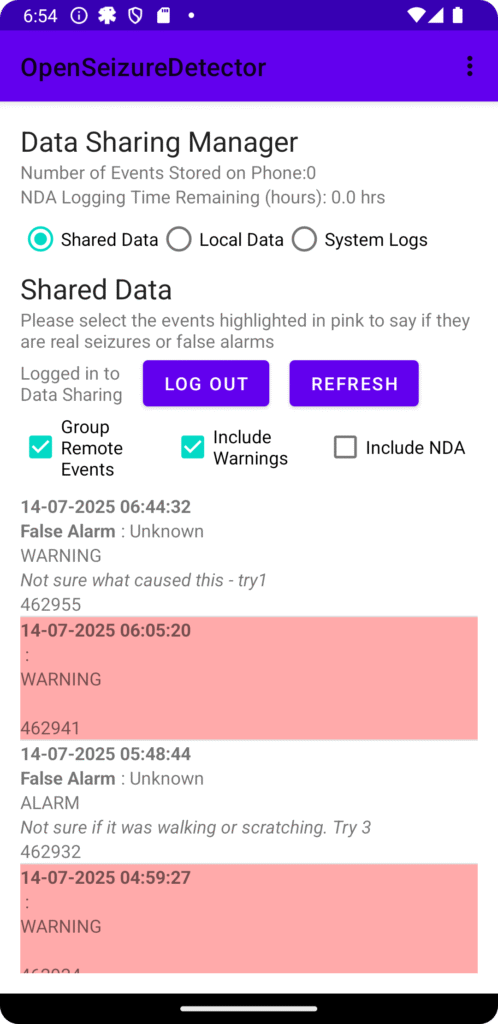
The main difference is that the Data Sharing screen (see image right) now has an option to Group Remote Events, which is activated by default, so you should see less events to edit, but in the background all of the events in the group will be given the same event type, sub-type and description.

Please treat it with some caution and check that it has done what you intended by de-selecting the ‘Group Remote Events’ and refreshing the data afterwards to make sure the changes are what you wanted.

Please report any issues on our bug tracker: https://github.com/OpenSeizureDetector/Android_Pebble_SD/issues

Thanks!

Graham (graham@openseizuredetector.org.uk)

PineTime Watch Performance

We have been using the low cost (~£35) PineTime watch for our ‘Production’ seizure detector for our son for over 1 year now. The report below summarises our experiences and our real-world observed seizure detection reliability.

See: http://www.openseizuredetector.org.uk/wp-content/uploads/2025/07/Seizure_Analysis.pdf for details

The summary for those who don’t want to read the whole thing is:

  • The PineTime watch has proven to be reliable (after initial teething troubles with connection reliability with one particular phone/watch combination).
  • The real-world seizure detection reliability based on movement detection is good with 85% detection reliability for tonic-clonic seizures, which is comparable to that observed for Garmin devices.
  • The heart rate alarm function has not been tested, but it is expected that the PineTime performance will not be as good as for Garmin devices.
  • False alarm rate remains high (of the order 2 false alarms per day), but this is comparable to that observed with Garmin watches.

Based on this, I would recommend that new users try PineTime first, as it is much cheaper than a Garmin watch, and only move to Garmin if they need heart rate alarms. If you are interested in trying it, please see the installation instructions here: https://openseizuredetector.github.io/pages-user/pine-time-installation.html

Graham (graham@openseizuredetector.org.uk)