Volunteers Needed for Student Project

Teun van Kessel, a student from the AUAS university in Amsterdam, is looking to improve the user interface and user experience of the Open Seizure Detector app as part of his graduation project.

As part of his project, he would like to speak with a few users to learn about your experiences with setting up and using the app.

If you’re interested in helping, please contact Teun at hvateun@gmail.com

Thanks!

Graham (graham@openseizuredetector.org.uk)

Release of V4.3 of OpenSeizureDetector on Google Play Store

Version 4.3.x of the OpenSeizureDetector Android App is now available for all users on the Google Play Store. The two changes are:

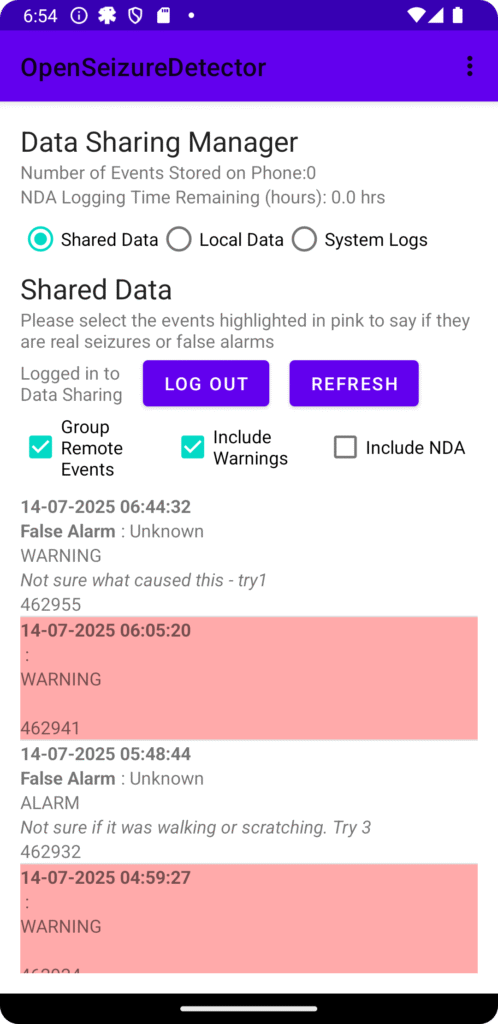
  • Improvements to the ‘Data Sharing’ screen so that events are grouped so that all events within a 3 minute period are treated as a single event, so you only have to edit it once (the other events in the group are updated with the same information when you edit it). The idea of this is to make reporting seizures easier as you only need to edit one event rather than every alarm and warning during the seizure.
  • Updated to target Android 15 (this is a requirement of Google Play Store). I think it is working ok, but some of the screen layouts seem to have changed a bit.

Please report any issues on our bug tracker at https://github.com/OpenSeizureDetector/Android_Pebble_SD/issues or email graham@openseizuredetector.org.uk.

Thanks

Graham (graham@openseizuredetector.org.uk)

Data Sharing – Grouping Events for Easier Editing

Those of you who use our Data Sharing system to contribute data to the Open Seizure Database will know that it can be a bit tedious to update every event (alarm or warning) to say if it was a real seizure or a false alarm.

To overcome this I have been intending for some time to group events so all events within a given period (3 minutes) are assumed to be the same event, and allow you to edit them together with the same information. This is actually quite a lot more difficult than it sounds, so I have been putting it off for some time :).

I now have an early test version and I would appreciate it if a few people would try it – it is not on Play Store yet, because I want to have it tested a bit more before I publish it.

If you would like to try it you can download V4.3.0a of the Android App from our source code repository at: https://github.com/OpenSeizureDetector/Android_Pebble_SD/blob/beta/releases/app-release-4.3.0a.apk

The main difference is that the Data Sharing screen (see image right) now has an option to Group Remote Events, which is activated by default, so you should see less events to edit, but in the background all of the events in the group will be given the same event type, sub-type and description.

Please treat it with some caution and check that it has done what you intended by de-selecting the ‘Group Remote Events’ and refreshing the data afterwards to make sure the changes are what you wanted.

Please report any issues on our bug tracker: https://github.com/OpenSeizureDetector/Android_Pebble_SD/issues

Thanks!

Graham (graham@openseizuredetector.org.uk)

PineTime Watch Performance

We have been using the low cost (~£35) PineTime watch for our ‘Production’ seizure detector for our son for over 1 year now. The report below summarises our experiences and our real-world observed seizure detection reliability.

See: http://www.openseizuredetector.org.uk/wp-content/uploads/2025/07/Seizure_Analysis.pdf for details

The summary for those who don’t want to read the whole thing is:

  • The PineTime watch has proven to be reliable (after initial teething troubles with connection reliability with one particular phone/watch combination).
  • The real-world seizure detection reliability based on movement detection is good with 85% detection reliability for tonic-clonic seizures, which is comparable to that observed for Garmin devices.
  • The heart rate alarm function has not been tested, but it is expected that the PineTime performance will not be as good as for Garmin devices.
  • False alarm rate remains high (of the order 2 false alarms per day), but this is comparable to that observed with Garmin watches.

Based on this, I would recommend that new users try PineTime first, as it is much cheaper than a Garmin watch, and only move to Garmin if they need heart rate alarms. If you are interested in trying it, please see the installation instructions here: https://openseizuredetector.github.io/pages-user/pine-time-installation.html

Graham (graham@openseizuredetector.org.uk)
Beta Test Version 4.2.12

I have just submitted a beta test version of the Android App (V4.2.12) for Google’s review so it can be released on Play Store. The purpose of this is to point new users to the installation instructions on the web site as there have been some critical reviews on Play Store lately because people had assumed it would work with certain watches, so they had not read the web site first.

The only changes in this version relate to the ‘install watch app button’ (this is hidden unless you have the Pebble data source selected, as it crashes for some of the other data sources) and I have added a ‘Help’ and a ‘Troubleshooting’ button to the start-up screen so users have somewhere to go if the app hangs during start-up. I have also added similar menu items to the main screen menu.

So there should be no noticeable difference for existing users – the beta test is just to make sure that I have not broken anything by mistake so I expect it to be very short before I make this the main version.

If there are any issues, please let me know
Thanks, Graham
(graham@openseizuredetector.org.uk)
Release of Version 4.2.11 of OpenSeizureDetector

Version 4.2.11 of the OpenSeizureDetector Android App should soon be available for all users to upgrade on the Google Play Store.

This release fixes a few issues reported by users over the last few months. The main changes are:

  • Adds support for the low cost PineTime watch for all users.
  • Addition of a ‘Flap’ detector which will alarm on low frequency, high amplitude movements which our Son has been doing during his partial seizures lately – that has improved our overall seizure detection reliability to well over 80%, including the partial seizures, which is very good. Note though that it will increase false alarms, so is probably only suitable for night time use.
  • Fixed an issue where the Data Sharing system was using a lot of data.
  • Added a user-selectable delay before sending an SMS alert, so the user has more chance of catching false alarms before the alert is sent.
  • Added a ‘Send False Alarm Notification’ menu item so the user can easily notify carers that a notification was a false alarm.

Please let me know if you have any issues with the new version.

Thanks
Graham (graham@openseizuredetector.org.uk)

V4.2.6 Available for Beta Testers

V4.2.6 of the OpenSeizureDetector Android App is now available for beta testing. It should be available on Play Store in a day or so (after Google have reviewed it), or it is available here now.

The main changes are:

  • Fixed problem with notifications in Android 13
  • Improved start-up checks for permissions
  • Improved system re-start after changing settings (but still not perfect!) – use the new ‘BLE2’ data source for PineTime and BangleJS watches.
  • Disabled the CNN algorithm by default as it is causing some false alarms (Issue #170)
  • Added watch signal strength history graph and watch battery history graph to main activity (only works for the new BLE2 data source with PineTime and BangleJS watches).
  • Added watch data to the system screen of main activity.
  • Support for V2.0 and higher of the Garmin Watch App (to reduce battery consumption – thanks to @pmithrandir for making a lot of improvements to the Garmin watch app.

Users of Garmin watches should not see any detrimental effects of this release – please let me know if you do.

Infinitime and BangleJS users should see the system shutdown behave better and give less issues with the app screen flashing between OK and FAULT after changing settings etc.

Please feed back experiences of using this version so we can decide what else to change before we make this the main relase for everyone.

Thanks
Graham (graham@openseizuredetector.org.uk)

V4.2.4 Available on Play Store for Beta Testers

V4.2.4 should be available on play store in a few hours if you are signed up as a Beta tester.

The only change in this version is in response to a user who has been testing PineTime – he found that sometimes it crashes without issuing FAULT beeps.

This version should enter a FAULT condition and emit fault ‘pip’ sounds rather than crashing silently.

Please try this version out, especially if you are trying out PineTime, and report any issues.

Thanks

Graham (graham@openseizuredetector.org.uk)

V4.2.3 Available for Beta Testing

Thank you to those who have provided feedback on the test versions of the Android App. We have addressed a few issues in response to that feedback, in particular we have fixed an issue with the Latch Alarms function not working correctly, and provided the ability to switch the different Heart Rate alarms on and off individually.

V4.2.3 should be available on Play store for those registered as Beta Testers in a few hours – please let me know if you have any issues with this release, as I am proposing to publish this as the main release very soon.

Thanks

Graham (graham@openseizuredetector.org.uk)

Version 4.2.2 Available for Beta Testing

Thank you to to those users who have been testing V4.2.1 before general release.

A user has spotted that the latest version of the PineTime firmware (V0.5) displays an error message on the screen when using V4.2.1 of the Android App. V4.2.2 adds support for sending the seizure detector status (OK, WARNING, ALARM) back to the watch for display on the PineTime watch, which fixes this issue.

It should be available for beta testers to upgrade in a few hours once it is approved by Google.

If there are any issues, please let me know (graham@openseizuredetector.org.uk, or raise an issue on our bug tracker).