
We are pleased to (finally!) release the new Version 5 of the OpenSeizureDetector Android App – it should be on Google Play Store shortly.
There are several major changes in this version:
- The ability to download Machine Learning (“AI”) models that we are making with the data provided by users via our ‘Data Sharing’ programme.
- A first-use setup “Wizard” to guide new users through setting up the system for the first time (using either a PineTime or Garmin watch)
- A simpler user interface – it defaults to a “Basic Mode” with no graphs, just a simple OK/ALARM status and Raise/Mute alarms buttons. You can disable Basic Mode in the General Settings page to get something that looks more like the current version.
- A lot of ‘behind the scenes’ improvements to improve the stability of the system and make it easier to maintain in the future.
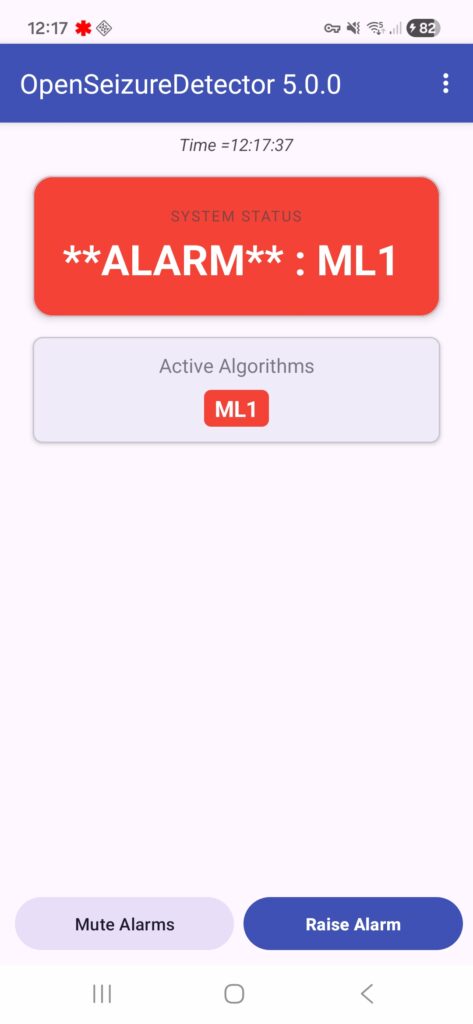
You can see the complete CHANGE LOG in the Source Code repository.
To simplify the user interface, it only lists PineTime, Garmin, Network and Phone data sources by default. If you want to select one of the more ‘experimental’ data sources, there is a ‘Developer Mode’ that can be enabled in the settings.
The Machine Learning model that the system recommends during installation is the ‘Run24’ one that I made in January and have been testing since. I am very pleased with its performance for or son, with it having >90% detection reliability. When I analyse the recently provided data from users, I am seeing just over 80% reliability, so it is comparable to the existing algorithm with ‘flap’ detection – but it should give fewer false alarms. Note though that it does still false alarm for doing things like using hand tools and travelling in a vehicle. Once the release of this version of the Android App has settled down, I will get back to working on a better model and making that available to users.
Thank you to everyone who has taken part in the beta testing of this app – you have found issues and made some very helpful suggestions to improve it.
When you find issues with this version, please report them via our bug tracker, or email graham@openseizuredetector.org.uk.
If you find a serious issue and need to go back to the previous version, you can download the installation (.apk) file for an earlier version from our source code repository: https://github.com/OpenSeizureDetector/Android_Pebble_SD/tree/master/releases
Thanks!
Graham (graham@openseizuredetector.org.uk)