
Solution to Garmin Connect Problems?

I think I have a solution to the problem that some users were finding if they upgraded Garmin Connect to a version that is more recent than 4.19.1, where the watch would not send data to the phone.

For those who are interested in the technicalities, it was a security improvement that Garmin implemented that meant that all http requests had to be encrypted (https). Now the communication between the watch and the phone is unencrypted, so it stopped working. It only happened on the most recent versions of Android where Google implemented this change – which is why I can’t reproduce it because I never buy the latest phones.

There was a bit of uproar in the Garmin developer forum, and Garmin have implemented a fix in the most recent version (4.22.1). Unfortunately they gave an exception that allows unencrypted connections between the watch and the phone, but not other web sites.

Unfortunately that did not cure the issue for us. This is becasue GarminSD sends the request to http://localhost, and the exception is to http://127.0.0.1. Now I thought they were both the same thing, but aparently not.

So to cure this I have produced V0.5 of GarminSD that sends requests to http://127.0.0.1. This works ok on my phone with Garmin Connect V4.2.2.1. All this means though is that I have not broken it, because it was working ok for me for starters. So please will some of you who were affected by the issue try installing V0.5 of GarminSD from the source code repository, and using it with the latest Garmin Connect from Play Store? And let me know if it works of course!

(Remember that when you copy GarminSD_v0.5.prg onto your watch GARMIN/APPS folder, you have to name it GarminSD.prg (ie no version number) – it should show V0.5 on the display as it starts so you know it has upgraded correctly)

Thanks,

Graham (graham@openseizuredetector.org.uk)

Release of OpenSeizureDetector V3.1.9

I have just uploaded V3.1.9 of OpenSeizureDetector to Google Play Store – it should go live in a few hours, unless I get into another protracted debate with Google over permissions…..
The changes in this version are:

  • Now requests READ_PHONE_STATE along with SMS permissions. This was because some phones failed to send SMS messages without this permission
  • Fixed the issue with Garmin Seizure Detector not producing warnings but going straight to alarm state – you now get a warning and if the seizure-like movement continues for another 5 seconds it gives a full alarm.
  • Added fault pips for missing heart rate data if the heart rate alarm is active.

The change to the Garmin Seizure Detector should be particularly useful for those users who are finding this a bit too sensitive and giving too many false alarms.

Although it should update automatically via Google Play Store, if you want to try it earlier you can download it from the project github repository here: https://github.com/OpenSeizureDetector/Android_Pebble_SD/raw/master/app/release/app-release-3.1.9a.apk

As always, please let me know if you have any issues with this update.

Graham (graham@openseizuredetector.org.uk)

Crashes on Android V9

Two users have today reported crashes of OpenSeizureDetector on Android V9 – this seems to be connected with pressing buttons on the start-up screen to open external apps such as the pebble app.

I have made a test version (V3.1.9a) which should cure that, and also makes some other changes I was working on:

  • Fix Crash on Android V9 when pressing buttons on the start-up screen.
  • Make the Garmin Data Source produce a warning before full alarm (like the Pebble one does) – note this will make the Garmin Data source seem less sensitive than it was.

It would be good if a few people could test this, using both Garmin and Pebble watches to make sure it works before I roll it out generally. It is available on the source code repository here: https://github.com/OpenSeizureDetector/Android_Pebble_SD/raw/V3.1/app/release/app-release-3.1.9a.apk.

Please let me know if you see any issues.

Thanks,

Graham (Graham@openseizuredetector.org.uk)

https://github.com/OpenSeizureDetector/Android_Pebble_SD/raw/V3.1/app/release/app-release-3.1.9a.apk

Potential Issue with Latest Version of Garmin Connect App

A user has reported OpenSeizureDetector Garmin Seizure Detector failing after upgrading to Version 4.20 of the Garmin Connect App.

It does not happen on all phones – it works fine on my Samsung J5, but did not work on his Sony Sony Xperia XZ2. He cured it by downloading the previous version (4.19.1) from the ApkMirror web site.

Please let me know if you experience a similar issue so I can work out what the problem is.

Thanks!

Graham.

SMS Problems on Some Phones

There is a problem with sending SMS messages on some phones. If you have granted the ‘Send SMS’ permission but still get ‘Failed to Send SMS’ errors, please let me know which phone you are using so I can make a list of the ones affected.

I have a fix for it in a draft version of V3.1.8 of OpenSeizureDetector, but it is not available on Play Store. If you need to use it do the following:

  • Download the V3.1.8 .apk installation file from our source code repository here and install it on your phone.
  • Go to the phone settings screen and select Apps->OpenSeizureDetector->permissions. You should see a ‘Telephone’ permission is present, but not selected – select it.
  • Now you should be able to start OpenSeizureDetector, accept the ‘Send SMS permissions’ and test the SMS function from the menu.

I will look at how I can get this into Play Store, but it is a ‘Dangerous’ permission as far as Google is concerned, so it is likely to be difficult!

Graham.

Release of V3.1.7

I have published V3.1.7 of the Android App to the Google Play Store. Main changes from V3.0.x are:-

  • Added Timer to give user opportunity to cancel SMS alarm before it is sent.
  • Made the Cancel Audible button inhibit SMS alarms as well as audible beeps.
  • Added Mute function from Gramin watch Menu button.
  • Added heart rate to data log.
  • Added fall detection algorithm to Garmin/Fitbit data source.

Please report any issues you have with this new version

Graham (graham@openseizuredetector.org.uk)
False Alarm Rate

I am going to be doing some comparisons of various seizure detection algorithms, so needed some statistics to use to compare. While the detection reliability for real (or maybe simulated) seizures is an obvious one, I thought the other one should be False Alarm Rate (ie number of false alarms per day).

I just pulled off the last month’s of log files from Benjamins Pebble Watch based seizure detector and analysed them. It gave the following graph:

Note that the “Alarm Ratio Threshold” setting was increased from 50 to 54 on 16 May

At the start of the month I thought we were getting more false alarms than usual and eventually I realised that after I changed phones I had not re-set the Alarm Ratio Threshold setting from the default 50 (more sensitive) to 54 (less sensitive) that we were using before – I changed it to 54 on 16 May.

The False Alarm rate was 1.4 alarms per day up to 16 May, and 0.9 alarms per day afterwards. We get a lot more warnings – of he order 7 warnings per day after the change.

I’d be interested to know how this compares to other users’ experience – please let me know at graham@openseizuredetector.org.uk or on our facebook page.

Alternative Seizure Detection Algorithm

I have been a bit quiet for a while because I have been looking into how to develop an improved seizure detection algorithm – in particular looking at improving the false alarm rate for seizure and fall detection. I have started a separate page on this site that I will keep updated as it progresses – please get in touch if you would like to help!

See: http://www.openseizuredetector.org.uk/?page_id=1241 for details

Graham (graham@openseizuredetector.org.uk)

You Get what You Pay For!

For the last few weeks I have been looking at ways to use machine learning to develop a more reliable detection algorithm for seizures or falls. This is likely to end up being a Neural Network, because these are very computing intensive things to train initially, but can be evaluated on lower power devices (such as an Android phone I hope!).

So I decided to get myself a new fairly powerful computer as a birthday present to train the neural network with the large amount of data I will need. I was lazy and bought a complete computer rather than a pile of bits, because someone sold ones that came with Linux pre-installed so I wanted to support them. But it didn’t have a dedicated graphics card in it, and I need a medium to high end NVIDIA graphics card to train the network.

So I went looking around for an NVIDIA GTX 1050Ti graphics card, and found a few on Ebay that looked extremely good value (with hindsight, suspiciously good value!), so I ordered it.

Eventually it arrived off the slow boat from china and it installed in the computer ok and displayed the screen using the Ubuntu Linux supplied drivers – so far so good…..

But to run the neural network (tensorflow-gpu), I need the NVIDIA CUDA library installing, and this installs the more up to date drivers for the card. When these drivers were installed, it wouldn’t work, reporting that my hardware was not compatible with the driver, but it should be……

I assumed it was my fault, because I’d heard reports of getting NVIDIA drivers to work on Linux is a bit of a pain, and if you don’t follow the instructions precisely it can go horribly wrong – so I re-installed the operating system and tried again – same effect. In fact I spent a few evenings this week reinstalling operating systems and drivers in different combinations – but all gave the same result.

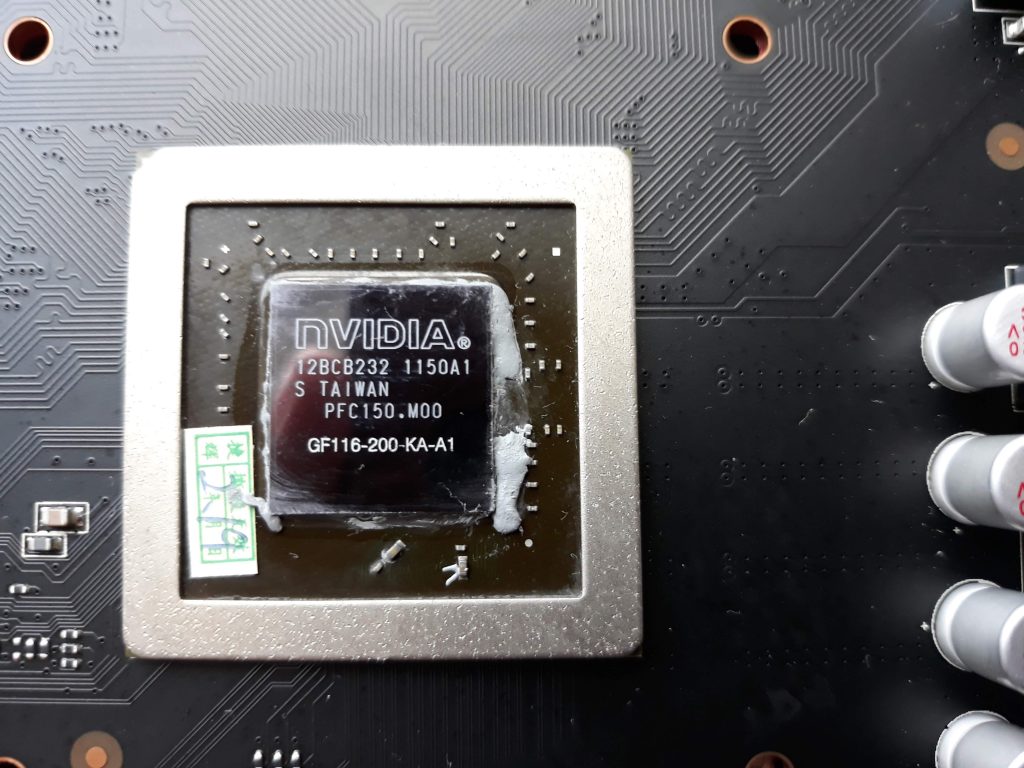
I had heard that counterfeit cards exist, so I decided to investigate….All the software reports the card correctly, and the label on the card looks correct:

so I resorted to pulling it apart to look at the actual GPU chip itself…

…And there was the problem. A GTX 1050 Ti card should have a GP107 chip in it, but this one is a GF116. A bit of googling did not find that precise model, but a GF116-250-KA-A1 (rather than the -200- shown above) was used in the GT400 series cards from 2010.

So the card I have got looks like an old model graphics card that has been re-labelled and had its software modified to report it as a modern(ish) GTX1050Ti card.

I have complained to the seller and Ebay so will see where I get, but I think I’ll have to buy one that looks more like the right price next time!

Issues to Fix or Improvements?

I am pretty close to updating the OpenSeizureDetector Android App on Play Store (to V3.1.x). The main change is to the SMS sending system where now, rather than sending an SMS as soon as a seizure is detected, it waits 10 seconds and beeps to alert the user – to give the user the chance to cancel the SMS alert if it is a false alarm.

Once I have published this update, I am not planning on a significant update to the Android App for a while, because I want to concentrate on improving the detection algorithm (using a machine learning approach rather than the deterministic algorithm we use at the moment).

So I wanted to check if anyone has any particular issues with the app, or suggestions for improvements to it that I should include in this update while my brain is still in Android programming mode?

The ones I have in mind, and would appreciate feedback on whether they sound right or not are:

  • Make the heart rate alarm work the same as the seizure detection alarm – you first get a warning, then full alarm, and if no heart rate is detected it is a Fault rather than an alarm condition.
  • Have another go at fixing the problem of multiple instances of something running, such that the start/stop server function does not really work – it keeps running in the background.

Is there anything else that is bugging anyone that they would like to see fixed?

Graham (graham@openseizuredetector.org.uk)