Version 4.2.1 Available for Beta Testing

Version 4.2.1 of the OpenSeizureDetector Android app should be available to those of you who are signed up for beta testing shortly.
New User Interface in V4.2.x

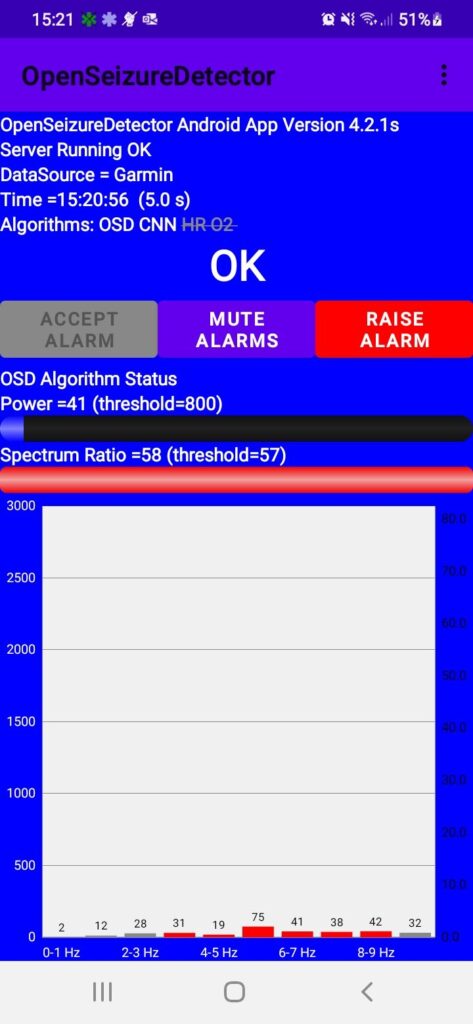
The two main changes in this version are introduction of support for the low-cost PineTime watch as a data source (by selecting the Bluetooth Data Source in the app settings), and introduces a simplified user interface as shown below. The bottom half of the screen can be swiped to show different screens of information.

If you are an existing user, this version should function exactly the same as the current one (but with some minor stability issues fixed). Please let me know if you find any new issues that should be fixed before we make this available to all users.

If you would like to help by beta testing this version, please sign up for beta releases here: https://play.google.com/store/apps/details?id=uk.org.openseizuredetector.

In addition to this release of the Android app, there is also a new version 1.4.1 of the Garmin watch app available. This version adds a menu to the watch app to allow the user to select the following:

  • How the wearer is notified of alarms (watch lighting up, buzzing etc.)
  • Enable ‘Ben Mode’ which makes the app more difficult to shut down accidentally (for users who tend to fiddle with their watches!).
  • Disable oxygen saturation monitoring to save battery life.
  • Enable a ‘Low Data Mode’ to try to improve the connection reliability for the VenuSQ watches, as Garmin have still not fixed the connection reliability issue that appeared last year.

If you have any problems with these versions please raise an issue in the Github bug tracker (Android App, Garmin Watch App), or email graham@openseizuredetector.org.uk.

I would also like to thank a number of contributors who have helped with these new versions: pmithrandir (garmin watch app updates), AroonPro (Android App, especially the heart rate trend graph), Rennard (Android App bluetooth data source to support PineTime).

Thanks, Graham.

Release of OpenSeizureDetector Version 4.1.13

Version 4.1.13 of the OpenSeizureDetector Android App is now available for all users from Google Play Store.

This is a minor bug-fix release which addresses an issue reported by two users where the background service part of the app had crashed, resulting in the system failing silently, without alerting the user with fault ‘pip’ warning sounds.

We regard the automatic fault diagnosis feature of OpenSeizureDetector to be very important to give the user confidence that it is operating correctly so this was a significant issue. Please report any instances of the system failing without giving fault warning pip sounds.

Thanks

Graham (graham@openseizuredetector.org.uk)

Trouble with Google Play Store

Well I was going to publish a beta test version of the updated Android App tonight, but discovered that Google is forcing us to upgrade to target Android V8. 
Trying to make that change seems to have broken a few things – the background colour of the app has turned white so it looks odd, and most importantly it is not showing a notification. I haven’t worked out how to change it so it will show the notification and still work on lower versions of Android. Maybe tomorrow…….
Suffering a slight sense-of-humour failure with Google for enforcing this upgrade that I don’t need!

Update to OpenSeizureDetector Android App

I need to update the OpenSeizureDetector Android App (https://github.com/OpenSeizureDetector/Android_Pebble_SD).   This is because the rules on apps having direct access to telephone and SMS services are changing, and if I don’t update how I do SMS messages, the app will be deleted from the Google Play Store.

Now since I don’t do many updates the the App, I am thinking of doing a few other changes at the same time, so the changes will be:

  1. Change method of sending SMS text messages to be consistent with the new rules.
  2. Add an extra ‘Passive Network Data Source’ which seems to be the way to communicate with alternative devices such as Garmin and Fitbit smart watches.
  3. Add the skeleton of a ‘BLE Data Source’ that I will use for the (possible) future Open Hardware seizure detection watch.
  4. See if I can work out why we sometimes end up with more than one copy of the background service running, which can cause some odd behaviours when you change settings.

Are there any other ‘features’ that are a annoying users that you would like me to have a look at as part of this update?   Please either post to the Facebook Page, or drop me an email with any thoughts (graham@openseizuredetector.org.uk).

Thanks!

Graham.

Release of OpenSeizureDetector V2.5.3

I have just published V2.5.3 of OpenSeizureDetector on the Android Play Store.

This comes with a new version (V2.6) of the Pebble app that will improve alarm annunciation reliability by avoiding the system resetting back to ‘OK’ straight away if, for example the user falls over during a seizure.

Please upgrade to this version, and also use the option on in the app to install the new watch App.

Problem on Android V6?

We recently set up a Samsung Galaxy Tab A (Running Android V6.0.1) to run as a Network Data Source to act as a remote alarm annunciator for Benjamin’s seizure detector, connected using WiFi.   We have been using this system for a couple of years – we were just using a different tablet computer.

Since we set it up it has go into an odd state twice – where it appears like it should be in a Fault condition, issuing fault ‘pips’, but it is not, and the status is shown as OK, with the data time shown as 00:00 – see screenshot below.

This is a significant failure of OpenSeizureDetector, because I designed it to do self checking to warn the user if something was not right, and it is not doing it.

Has anyone else seen this and not reported it?   It may be limited to the ‘Network Data Source’ mode of operation, and I don’t think many people are using that, but please let me know if you have seen it, as I haven’t spotted the cause of it yet.

Thanks

Graham.


Beta Release of OpenSeizureDetector V2.5.1

I have just released a new Beta test release of OpenSeizureDetector on Google Play Store (V2.5.1).

The only change is an improvement to handling alarms from short duration seizures.   If a seizure is only detected for a short period, the previous version may only give a single set of Alarm beeps, which may be insufficient to alert a carer.

With the new version, if you enable “Latch Alarms” in the Alarms settings then when an alarm initiates, the alarm beeps will sound for the period specified in the “Latch Alarm Timer Duration” setting, even if the alarm resets quicker.

You can stop the alarm to silence the beeps earlier by pressing the Accept Alarm button.  This works both on the main OpenSeizureDetector app screen, and also if you are running it on another device using Network Datasource to provide alarm annunciation in a different part of the house.

This is as a result of the seizure Benjamin had last week, when we only got a single sent of alarm beeps.   This is fine if you are awake and alert, but if you are asleep it may not be enough to rouse you.   More details of this event on the Real Test of OpenSeizureDetector page.    A further update will follow fairly soon with an improved algorithm to detect seizures with lower frequency movement.

Real Test of OpenSeizureDetector

Summary

Benjamin had a seizure yesterday morning (03/05/2017).  It was not a ‘classic’ tonic clonic seizure (with rapid shaking of the arms).  Instead he was lying on his back with arms stiff in the air and ‘waving’.  This movement was on the borderline of detectability by OpenSeizureDetector.  It gave one WARNING and one ALARM.   On the positive side, it did detect the seizure.   On the negative, it only gave a single ALARM initiation, which might not be enough to wake you up if asleep.   Reducing the AlarmRatioThresh setting will increase sensitivity to improve detection reliability in the future.

Description

The seizure was not a ‘classic’ tonic clonic seizure (quite rapid shaking of the arms).  Instead Benjamin was lying on his back with arms stiff in the air and ‘waving’.

OpenSeizureDetector gave one WARNING notification at 06:24:24 on 03/05/2017 followed by a single ALARM initiation at 06:20:30, then it re-set.

The movement was right on the limit of detection using default settings which look at a frequency range of 3bHz to 8bHz as the Region of Interest.   The movement peak was at 4bHz, but there was quite a lot of power in the 1-3bHz range too and not much above.  This meant that the region of interest average power was quite low – see graph below showing the frequency spectrum of the movement during the alarm (the grey shaded area is the 3-8 Hz region of interest).

The calculated spectrum ratio (=10x[Region of Interest Power]/Spectrum Power) was 59, against a threshold of 56 (the threshold had been set higher than the default 50 to reduce false alarm rate).

We use a second android device running OpenSeizureDetector in ‘Network’ mode to relay the alarm notifications to other parts of the house over wifi.   The second device gave a WARNING but did not go into alarm.   I think this is because of a timing issue with the ALARM being raised for only a short period, so this is something to look at as we would have expected the alarm to sound on both devices.

Changes to Settings

Detection of this particular type of seizure could be improved by reducing the Region of Interest to be 3-6 Hz rather than 3-8 Hz, but this would reduce the sensitivity to seizures resulting in higher frequency movement.   Benjamin’s worst fits have been the higher frequency type, so I am minded to retain detection in that region so have retained 3-8 Hz region of interest for now.

I have reduce the AlarmRatioThreshold back to 50 rather than the 56 that we were using to increase sensitivity.

So the main settings we will be using for now are:

  • alarmFreqMin = 3 Hz
  • alarmFreqMax = 8 Hz
  • alarmRatioThresh = 50

Software Changes

I will update the phone app to give multiple alarm sounds rather than just 3 beeps in the near future to improve the chances of you noticing a single alarm annunciation.

In the meantime, users could consider switching on the Latch Alarms option in the Alarms settings – this will make the system alarm continuously until you press the ‘Accept Alarm’ button on the phone app.

Conclusion

OpenSeizureDetector did detect this slightly unusual seizure, but it was right on the limit of detection, so just gave a single WARNING and a single ALARM notification.

Increasing the sensitivity by reducing the AlarmRatioThresh setting should improve detection in the future.  Other changes would improve detection of this seizure type to the detriment of detection of higher frequency movement seizures, which is probably not a good idea.

Android Wear Version – Update 1

We have made some progress with an Android Wear version of OpenSeizureDetector (long train journeys for work have their uses!).  It is not ready for testing yet, but it is starting to take shape.   What we have got is:

  • A very simple Android Wear app that does the basic seizure detection calculations – collects acceleration data and does Fourier Analysis to get us a frequency spectrum.
  • Packages the analysis results into a message that is sent to the OpenSeizureDetector app on the phone.
  • The development version of the OpenSeizureDetector phone app (V3.0.0) has an ‘Android Wear’ data source that works in a similar way to the Pebble data source – it waits for the watch to send it data, and displays the data on the screen, raising alarms when necessary.
  • You can see it running on the phone and my Android Wear watch below


For those who are interested, the source code for the watch app is at https://github.com/openseizuredetector/AndroidWear_SD

and the updated phone app is the V3.0.x branch at https://github.com/OpenSeizureDetector/Android_Pebble_SD/tree/V3.0.x

Any offers of help would be gratefully received!!

What is left to do?

Plenty!:

  • Check the seizure detection calculations on Android Wear – I think the values are higher than the equivalent Pebble one, so we must have units wrong somewhere.
  • Provide a way of editing the seizure detection settings for the Android Wear seizure detector (They are hard coded at present – need to provide a user interface on the phone to edit settings, and ability to send settings to the watch), and maybe allow on-watch editing too?
  • Add ability to start the seizure detector watch app from the phone, so it starts when the OpenSeizureDetector phone app starts.
  • Add a user-interface to the watch like we have on pebble – ability to raise alarms manually, and mute alarms if you are doing something that is liable to trigger a false alarm.
  • Find out why it does odd things when I disconnect the debugger from the watch – it was working fine for half an hour with the USB debugger connected, and is showing FAULT now I have disconnected it….. (seemed to need a manual re-start…).    I think it may be going to sleep after a while….
  • Some Android Wear devices have heart rate monitors – maybe use that to look at heart rate and blood oxygen saturation too? (I’ll need to get a watch with these sensors to try that though – my Sony SmartWatch 3 does not have them).

Android Wear Version of OpenSeizureDetector?

With Pebble watches no longer being produced we will need a different hardware platform if we keep the OpenSeizureDetector project going.

We could just leave it and use the Embrace watch, but I am not that happy with Embrace for two reasons:

  • I am not convinced about its detection reliability – I can not make it go off doing what I think of as seizure-like movements (but other people report it working well for them, so it could just be me).
  • The alarm annunciation infrastructure is very complex – the watch talks to the paired phone, which uses a wifi or mobile internet connection to connect to the Empathica servers.  The servers then use the mobile phone infrastructure to make a phone call.   But I mostly want a device in the next room to go ‘beep’, so I would rather have a more direct connection (OpenSeizureDetector uses WiFi so avoids a lot of the infrastructure)

So, given that I am looking for an alternative platform for OpenSeizureDetector.   It is very tempting to try to make one – it would be fun to do the electronic design and firmware, but that would be a big undertaking, and not something I could do in my spare time, so I need a commercially available platform.

I have been looking at Android Wear, which has been suggested by a few people – I did not use this before because Android Wear devices are so much more expensive than Pebble Watches.  For Android Wear to be feasible, we need to confirm a couple of things:

  • We can obtain accelerometer readings at a high enough frequency (~50 Hz), and do Fourier analysis on it to do the seizure detection.
  • The battery consumption has to be reasonable.

I have made a proof-of-concept Android Wear app to test it out.   The App does the following:

  • Starts a background service that collects accelerometer data for about 5 seconds, then calculates a Fourier Transform of the data….then repeats indefinitely.
  • The activity connects to the service and shows the number of samples collected, so you can see it is doing something.

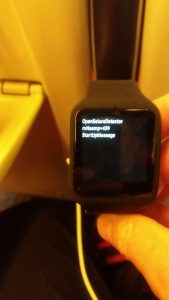
It does not look very exciting – see picture of it running on my Sony Smartwatch 3 above.
...but most importantly, it is surprisingly (suspiciously so if I am honest) frugal with the battery.   The second half of this trace has the new app running, and it is still only draining of the order 1% per hour.

So based on this, I think porting OpenSeizureDetector to Android Wear is feasible.   There is quite a lot to do to get it working though:

  • Communication to the phone (both settings and alarm status updates)
  • On-watch user interface (mute, manual alarm etc.)
  • Port Seizure Detection algorithm – the acceleration units are different in AndroidWear compared to Pebble, so we need to do some scaling so that the seizure detector settings can be the same.
  • Package the Android Wear App – it will probably be a different Google Play Store app, so we will need to integrate that into the OpenSeizureDetector Android App.

Fortunately there are a couple of other people interested in helping, so there is a fair chance of getting this finished this year.