The next major release of OpenSeizureDetector will include the facility to share seizure data and false alarms with developers and researchers to allow the improvement of seizure detection algorithms.
Some explanation of the process, and a demonstration of the app are in the video below. The video is in three parts:
Introduction: Reason for introducing data sharing and how it works
Initial Set-Up: Creating an account on the Data Sharing database, and logging in via the OpenSeizureDetector Android App
Reporting Seizures: How to report whether detected events are genuine seizures or false alarms.
I would appreciate comments from users on the data sharing process and user interface – I’d like to incorporate user feedback before we publish the app.
Please comment on YouTube, the associated Facebook post, or email graham@openseizuredetector.org.uk. Thanks!
If you see the ‘OK’ on the watch app screen being replaced by ERR -xxx (Where xxx might be -300, -102 etc.), this might be a sign that the Android system is putting the OpenSeizureDetector app to sleep to save power.
There are two separate places where you need to make sure that OpenSeizureDetector is not going to be put to sleep or ‘Optimised’.
Prevent apps being put to sleep by opening the phone settings and selecting “Battery and device Care” -> “Battery” -> “Background usage limits” then either de-select ‘Put unused apps to sleep’ or ensure that OpenSeizureDetector is in the ‘Never sleeping apps’ list.
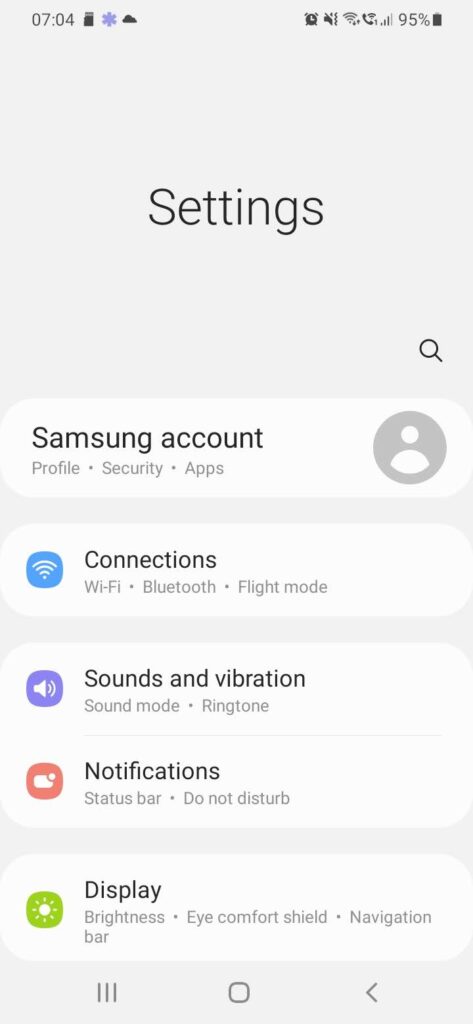
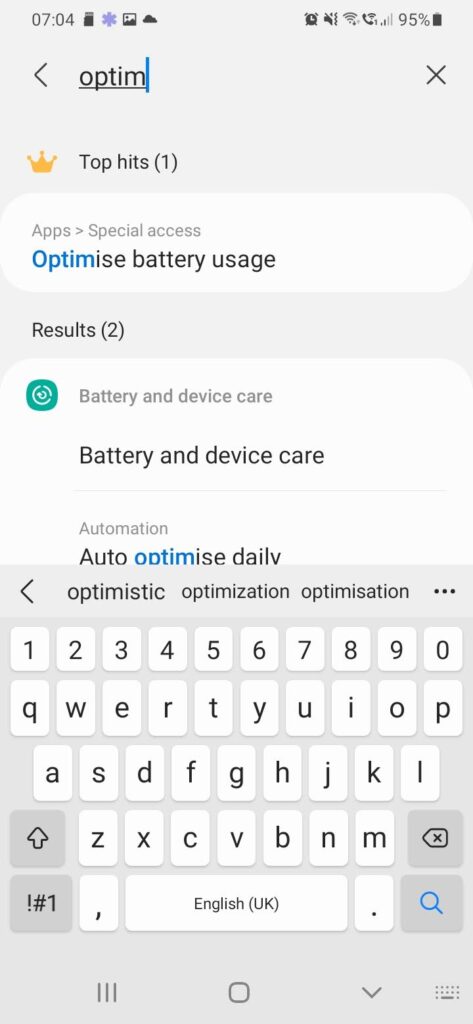
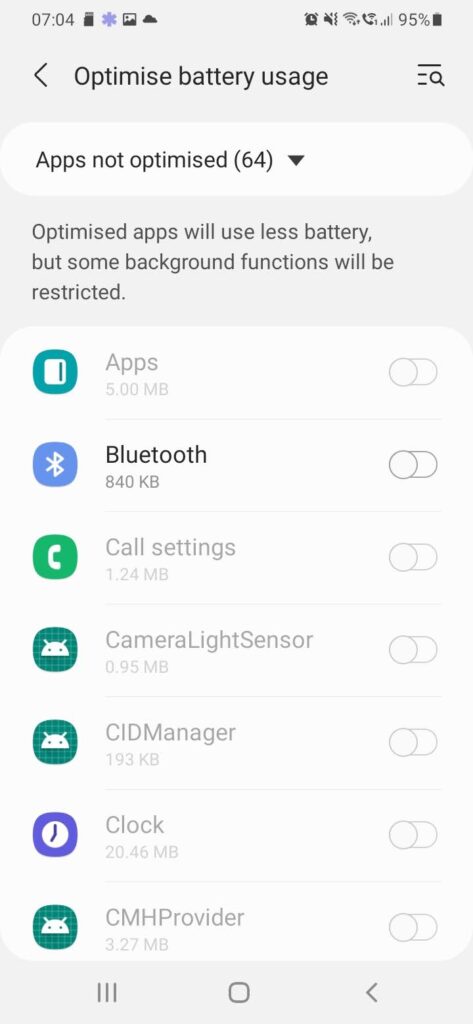
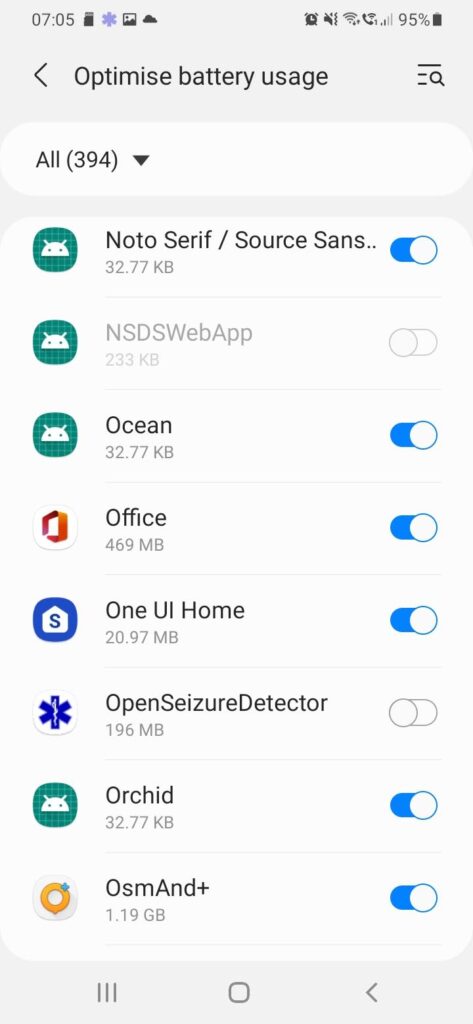
The settings to prevent apps being ‘Optimised’ are more difficult to find. The following worked on my Samsung phone (see the notes below each image)
Open the Phone Settings Page, and click SearchStart to type Optimise…..and select “Optimise Battery Usage”Select “Optimise Battery Usage”By default, it lists the apps that are NOT optimised. Click on the ‘Apps Not Optimised’ text….And select ‘All’OpenSeizureDetector now appears on the list. Ensure that it is NOT selected – this means that the OpenSeizureDetector battery usage will not be optimised, so it will operate correctly when the phone is operating on battery power.
I recently (Dec 2021) bought an Amazon Fire 10 HD tablet when they were on special offer. I was not sure if OpenSeizureDetector would work on it because it is Amazon’s own version of Android and it does not have Google apps installed on it.
I am pleased to report that it does work, but to install OpenSeizureDetector and Garmin Connect from the Google Play Store, I had to install Google Play Store from the apkmirror.com web site. You need to download the .apk files for the latest versions of the following apps:
Google Play Services (I got version 21.45.16)
Google Play Store (I have version 28.2.10-21)
They will install on the fire tablet provided you go into settings -> security & privacy -> “Apps from Unknown Sources” and enable installing apps from unknown sources.
Once you have done that you can open Google Play Store, sign in, and download Garmin Connect and OpenSeizureDetector as per the usual instructions.
There is no particular driver for using an Amazon Fire device rather than another android device, except that they are often on special offer and quite cheap in that case (provided you can tolerate the adverts!).
Back at the start of 2020 I drafted an updated Privacy Policy for OpenSeizureDetector to allow users to (optionally) share their seizure detector data to allow us to build up an open source database of data associated with real seizures and also activities that lead to false alarms. The idea is that we will use this data to develop better seizure detector algorithms and also compare the real-world reliability of OpenSeizureDetector to other devices such as the Empatica Embrace to see how they compare.
My day job got very busy so I didn’t get the database or changes to the OpenSeizuredetector phone app finished, but am starting to work on it again now.
Please will you look at the updated Privacy Policy as described here: https://www.openseizuredetector.org.uk/?p=1417 and feed back your thoughts on it (both positive and negative!) either by email to graham@openseizuredetector.org.uk, or if you prefer in the comments to this post on the Facebook Page (https:/facebook.com/openseizuredetector).
Several users have asked whether it would be possible to use the Blood Oxygen Saturation sensor in the more recent Garmin Watches to generate an alarm – this could be a useful indication of reduced breathing during a seizure so add to the detection reliability.
Up until now I have said it is not possible because the Garmin software does not give us access to the data from the sensor. Recently though a user, Steve Lee has pointed out that the more recent software from Garmin does allow us to access the O2 saturation sensor, so we have worked on an update to the Garmin watch app and the phone app to make use of it.
At the moment it is very much in the experimental stage, because I am not sure how often the O2 saturation is updated – Even if you enable all-day monitoring it appears that it only updates every 5 to 15 minutes during the day, but should update about once per minute during the ‘sleep time’ you set in the watch configuration on Garmin Connect. I think we need once per minute to be useful as an alarm parameter.
The current state of the code is:
The watch app receives updates to the O2 saturation whenever the Garmin software provides one, and sends it to the phone app.
The phone app has extra settings in the ‘seizure detector settings’ screen to enable O2 Saturation alarm and set a low level threshold to generate an alarm.
To make it work you need to enable the O2 saturation sensor in the watch menu or Garmin Connect, and enable all-day monitoring. It looks like setting a very long ‘sleep time’ in the watch settings will force it to update the O2 saturation data more frequently (at the cost of battery life).
So if anyone would like to try this out, I’d be interested to hear how you find it so we can decide whether to include it in the published OpenSeizureDetector app. I’d be particularly interested if anyone does have issues with O2 saturation whether the results from the watch look reasonable or not. If you would like to try it, you need the test version 3.7.0b of the watch app from the source code repository here: https://github.com/OpenSeizureDetector/Android_Pebble_SD/raw/O2SAT/app/release/app-release-3.7.0b.apk
If the watch wearer and the carer are in the same building, you can use the Network Datasource on the carer’s phone to monitor OpenSeizureDetector on the user’s phone and generate the same alarms etc. It has not been possible to do this over mobile internet connections because of limitations is how signals are routed to mobile devies.
An OpenSeizureDetector user, Steve Lee has been looking at how to make it work and has found that by using a Virtual Private Network (VPN) the user’s and carer’s phones can communicate even over mobile internet. Thank you, Steve for the following instructions:
Create an openvpn cloud account by going to https://openvpn.net/cloud-vpn/ and then click Activate your free three connections
Enter email address and create your account
Click on link in the verification email and then enter a secure password and other details.
Create a unique openvpnid – this is your private network
Setup cybershield – accept all defaults
Install the andrioid openvpn connect on each phone specifying the openvpn id from above
Start openvpn connect using the email and password from above – it will display connection status
Note YOUR_PRIVATE_IP on the sending phone
Configure the receiving phone open seizure detector network datasource server ip address to be the private ip address above.
I have had a few people contact me recently about getting involved with the development of OpenSeizureDetector. This is very good – help is aways appreciated! I have started a Getting Involved page where I list some of the things that both technical and non-technical folks could help. If you can think of other things that should be on the list, please let me know.
And of course if you would like to have a go at doing any of these, please drop me an email: graham@openseizuredetector.org.uk.
We have released V1.0.6 of the SmsAnnunciator app, which runs on a carer’s phone to generate an alarm sound when an OpenSeizureDetector SMS alert is received.
The main change is the addition of a Polish Translation (thanks to Artur Chlebek). It is not available on Google Play store, but you can install it by downloading the .apk file onto your phone from the Gitub source code repository here: https://github.com/OpenSeizureDetector/SMSAnnunciator/releases/latest
Please let me know if you have any issues with this version.
I have just published V3.6.2 of the OpenSeizureDetector Android App on Google Play store, so it should be available for upgrade in a couple of hours.
This release is intended to fix the problem with file permission issues reported by users on some Android 10 phones. I have done this by changing to using the Android ‘Internal Storage’ folder. You should not notice any difference other than you will not be able to see older log files with the ‘view log files’ menu option. The files are still there, but you will need to use a file browser app or connect the phone to a computer to see them. The other change will be that the ‘Clear Data’ option in the Phone Settings->Apps->OpenSeizureDetector will delete the log file entries.
The other changes are to translations – thank you to Artur Chlebek for his help with this – I think we have now extracted all of the English text in the user interface and settings screens so they are translatable, and Artur has provided a complete set of polish translations. If any users are annoyed at the English text appearing rather than their local language, please let me know and we can add the translations to get rid of the English.
I think we might have a solution to the issue with log file access permissions on some Android 10 phones. I still don’t know why it only affects some phones and not others though!
If you are affected by it and downgraded to V3.6.0 as a work around, please will you try a test version (V3.6.2a) from our source code repository here?
Please let me know if this fixes the problem for you. If it does not, you can re-install V3.6.0 from the repository here.
As usual, please report any issues to graham@openseizuredetector.org.uk.