Fixed Problem with Pebble Classsic Version

I noticed last week that following updates to the Pebble software, OpenSeizureDetector had become less reliable (and sometimes did not work at all) on the original Pebble Classic watches (but Pebble Time continued to work ok).

I have fixed this problem and published a new version (v2.1) on the Pebble App Store (https://apps.getpebble.com/applications/54d28a43e4d94c043f000008).

I recommend that all users upgrade to this version.

For those who are interested, it was a schoolboy error on my part – I had ignored a compiler warning that I was asking to allocate a lot of memory, and this could cause problems with future versions – now rather than asking for maximum memory allocation for the communications buffers I am using a fixed 512 bytes, which is plenty for the messages between watch and phone that I use – offending code here:   https://github.com/OpenSeizureDetector/Pebble_SD/blob/master/src/comms.c#L193.

Graham.


Problems with Pebble Classic

Please note that the OpenSeizureDetector set-up that I have for my son developed a problem today and the watch app stopped talking to the phone (so the phone just gives those annoying fault ‘pips’).   I do not know what has caused the problem, but I suspect that it is to do with an update to the Pebble software.
Therefore I would recommend that if you are given the option to upgrade the Pebble Software you do not upgrade it for the time being, until I work out what is wrong with mine and confirm that the upgrade will be ok for you.
Note that I have another system that is using a Pebble Time rather than the older Pebble Classic – the Pebble Time one is working ok, but my two Pebble Classics are not.

Beta Release of Version 2.0.4 of OpenSeizureDetector

Screenshot_2016-05-14-22-34-49I have just publshed a beta test release of OpenSeizureDetector V2.0.4.  Changes are:

– Improved handling of watch app settings.
– Changed default AlarmFrequencyMin setting to improve detection reliability.
– Install watch app directly from phone rather than using pebble store.
– Main screen graph now a bar chart showing frequency
region of interest.

Opt-in to beta testing here, then it will install from Google Play Store.

As usual, any comments or feedback to graham@openseizuredetector.org.uk, or facebook please!

OpenSeizureDetector Bug Fixes

icon_48x48I have just published V2.0.3 of OpenSeizureDetector on the Google Play Store (should be available in a couple of hours).

This fixes a bug that resulted in a crash of the app if the fault warning beep was sounding when the app re-starts (for example if you change the settings to cure the fault).

Sorry about that!

Use of AngelSensor as a Seizure Detector

I have just bought an Angel Sensor M1 wristband to try it out as an alternative seizure detector to the Pebble.

The OpenSeizureDetector Android App is written to allow extra ‘data sources’ to be used, so I will have a go at writing a DataSorurce that uses the angel sensor instead of the pebble.   The first effort will be to repeat the same functionality as you get with the Pebble, then extend it to use the other sensors such as skin conductivity and heart rate.   This should reduce the number of false alarms compared to the Pebble…If I can make it work!

Initial findings:

  • The Open Source Angel Sensor Android app installed ok and said it was scanning looking for the device.
  • The instructions (http://angelsensor.com/start) said press the button on the device to switch it on – it was hard to see the button – there is a hard plastic blister on the top, but it doesn’t move when you squeeze it.   Started to think the device is dead…..
  • Tried plugging it into the charger – the LEDs in the device came on, which is a good sign, but nothing else.
  • Waited a while…..
  • Now squeezing the plastic blister on the device makes it vibrate a bit – I think long and short presses do different things….
  • After a few presses must have managed to switch it on and the phone app connected to it – phone app displaying temperature and has placeholders for other parameters such as steps and heart rate, but they are not displaying values….  Display says battery is


Release of OpenSeizureDetector V2.0

pebble_screenshot_2016-02-17_21-41-11I have finally fixed the last few bugs (that I know about), and have Released V2.0 of the OpenSeizureDetector Pebble Watch App and Android App.

There are a lot of ‘behind the scenes’ changes to the Android App to make the code easier to maintain in the future.  From a user’s perspective, the changes yopebble_screenshot_2016-02-17_21-41-54u will see are:

  • You can mute the alarms using the top watch button (long press).
  • You can manually initiate an alarm using the bottom watch button (long press).
  • The system should be easier to install from scratch because it will prompt you to install the Pebble Android App and the OpenSeizureDetector watch app if they are not installed.
  • There is a new start-up screen that shows which bits of the system are working – this will help with fault diagnosis as the main screen is not displayed until everything is ok.
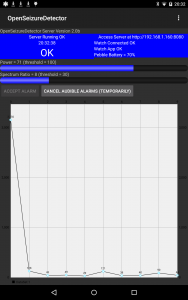
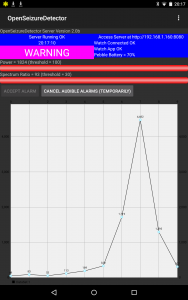
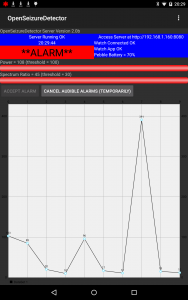
  • The main screen has two graphs that show how far the system is off alarming – when both bars get to the right and side and turn red, it alarms.
  • The system settings have been organised into different screens to make it easier to find things.
  • The ‘general’ settings allow the user to select a ‘datasource’  this is either ‘Pebble’, in which case the system talks to the pebble directly, or ‘network’, in which case it will receive data from another device running OpenSeizureDetector – this is useful to extend the range of alarms to other parts of the house (this is what the OpenSeizureDetector Client app does – so the client app is now redundant).

Although I have fixed a lot of bugs in this release, the changes have been so significant that I am bound to have introduced new issues – please feed back any issues you have – ideally to the Facebook page I have set up so others can see it, otherwise email me (graham@openseizuredetector.org.uk)

Detection Algorithm Comparison

I have been thinking about seizure detection algorithms.   The one I use for the OpenSeizureDetector Pebble watch looks for movement in the range 5-10 Hz, which seems to work for the high frequency jerky type of movements that I associate with a tonic-clonic seizure.   Although they have not published their algorithm, this seems similar to the Neutun app detection method.  Ryan Clark’s PebbleSeizureDetect uses a band pass filter to select a 1-3 Hz range, which is a much slower movement.     I am sure he has found that this works for the sort of seizures he is trying to detect.

I have made a couple of videos showing the sort of movement that the two algorithms detect – the watch on the left is running OpenSeizureDetector, and the one on the right PebbleSeizureDetect – you can hear the buzz when PebbleSeizureDetect alarms, or see the ‘WARNING’ or ‘ALARM’ phrase on the OpenSeizureDetector screen.

My concern is that the two algorithms are quite different – a seizure that alarms with OpenSeizureDetector will not trigger PebbleSeizureDetect.   I am pretty happy with the OpenSeizureDetector one – I have had some positive reports of it detecting seizures ok, and the movement it detects is consistent with some of the movement you can find on some slightly disturbing YouTube videos of people having seizures,  But Ryan developed his to work for his application…so which one is best to give the highest detection reliability?

Any thoughts would be appreciated – please either email graham@openseizuredetector.org.uk or use the Facebook OpenSeizureDetector page.

Video 1 – shows the ‘borderline’ movement that just alarms OpenSeizureDetector – first a few intermittent ‘WARNING’ alarms, then with a slightly higher amplitude movement, goes into ‘ALARM’ – PebbleSeizureDetect does not respond.

Video 2 – lower frequency movement that alarms PebbleSeizureDetect (about 25 seconds in), but not OpenSeizureDetector – demonstration of the higher frequency movement that alarms OpenSeizureDetector at the end of the video.

Final Testing of OpenSeizureDetector V2.0

I am just doing some final testing of V2.0 of OpenSeizureDetector, with a view to releasing it at the weekend, which will be exactly a year since I published the original version.

The things that have changed for V2.0 are:

  1. Manually raise an alarm by pressing and holding the DOWN watch button.
  2. Mute the alarms (for a selectable period) by pressing and holding the UP watch button.
  3. Major internal re-write of the android companion app, so it can use different data sources – this means it is ready for when Embrace ship their seizure detector watches – I will be able to make it compatible with the OpenSeizureDetector phone app.
  4. The Android app acts as both the server (which talks to the watch) and also the client (which talks to the server to give remote alarm annunciation) – no need for a separate client app any more.
  5. Pretty bar graphs showing how close you are to an alarm state.
  6. Tidier settings screens.
  7. Start-up screen to show the system initialising.
  8. User selectable data transfer period – you can reduce the amount of data sent from the watch to the phone – this is the most disappointing feature because it does not give the saving in battery power that I had hoped for.

OpenSeizureDetector V2.0 Preview

I am pretty close to releasing V2.0 of the OpenSeizureDetector Android App.

If anyone would like to try it out, and feedback any difficulties or suggestions, you can get the app from the projects github repository:  app-release-2.0d.apk.

The main changes from the 1.x version currently on Android Play store are:

  1. Added start-up screen that shows the bits of the system starting and confirms they work before showing the main screen.
    1. If pebble datasource is selected, start-up screen has an option to
      open the pebble app to manage pebble connection issues, and to install the watch-app directly.
  2. The main screen has been tidied up a bit, and now includes bar graphs to show how close to alarming the current movement is..
  3. Settings screen broken down into different logical screens to make it easier to find a setting to change.
    1. Changing a setting now re-starts the whole app to make sure the new setting is being used.
  4. Added an ‘about’ page with links to http://openseizuredetector.org.uk web site and copyright and acknowledgement notices.
  5. Added ability to latch alarms so they have to be actively accepted to silence the alarm, rather than it re-setting when the movement stops.
  6. Fixed problem with the system being difficult to shut down if as multiple instances of main screen could be active at once.
  7. It is now compatible with both the original Pebble Android App and the new Pebble Time Android App, and works with both the original Pebble and Pebble Time watches.
  8. Merged the ‘server’ and ‘client’ apps into one, so you can select the ‘data source’ in settings to be either the pebble watch directly or the network.  This means you can install the app on two devices and the second one, selected to ‘network’ data source will mirror the screen and alarms that are shown on the other device.

Issues with Pebble Time [Solved?]

Before Christmas I released an updated version of the OpenSeizureDetector watch app that will run on a Pebble Time, and at least one user got it working ok.  Another user recently reported that although the app runs on the Pebble Time, it does not send data to the phone.

I have made an updated version of the phone app addresses these issues, so if you are using OpenSeizureDetector on a Pebble Time, or a Pebble Classic using the “Pebble Time” phone app, I would recommend using  version 2.0c of OpenSeizureDetector.   Screenshots of V2.0 shown below – it now includes ‘approach to alarm’ indicator bars.

(Note that this version is a test one, so you may have to allow ‘untrusted sources’ in your android settings to get it to install – once I am happy that it is working ok, I will release it on Play Store.)

Screenshot_2016-01-16-20-32-42

Screenshot_2016-01-16-20-17-16Screenshot_2016-01-16-20-29-49