Comparison of Watch-Based Seizure Detectors

There are now a few watch based seizure detectors available.   The following table attempts to show a comparison between them:

Feature / App Open Seizure Detector Neutun Pebble Seizure Detect Smart Monitor
Open Source Yes No Yes No
Subscription Required No No (at the moment??) No Yes
Operating Systems Android Android / IOS Android / IOS ?
[simple_tooltip content=’If Yes the watch can only be used as a seizure detector – other smart watch featuers may not work’]Takes over Pebble Watch[/simple_tooltip] Yes No – background process Yes No?
[simple_tooltip content=’The watch app or the companion phone app monitors itself to make sure everything is working, and raises a warning alarm if not’]Fault Monitoring and Warning Alarms[/simple_tooltip] Yes No No Yes
[simple_tooltip content=’Alarms are sent by SMS text message to carers phones’]SMS Text Message Alarms[/simple_tooltip] Yes Yes? Yes Yes
[simple_tooltip content=’The alarm status can be monitored using a web browser’]Web Based Alarms[/simple_tooltip] Yes No No No
[simple_tooltip content=’Another device can be used to monitor and raise alarms using the home wifi network’]Local (wifi) based Alarms[/simple_tooltip] Yes No No No
[simple_tooltip content=’The app will log seizures and remind the user to take medication’]Seizure and Medication Tracking[/simple_tooltip] No Yes No Not yet

Improving Seizure Detector User Interface

I am working on a re-write of the OpenSeizureDetector alarm system. Most of the changes are not visible to the user – they are making it possible to use different detector hardware like the Embrace watch when it is available, but some will affect the user interface, so I’d appreciate any feedback before I do the update….

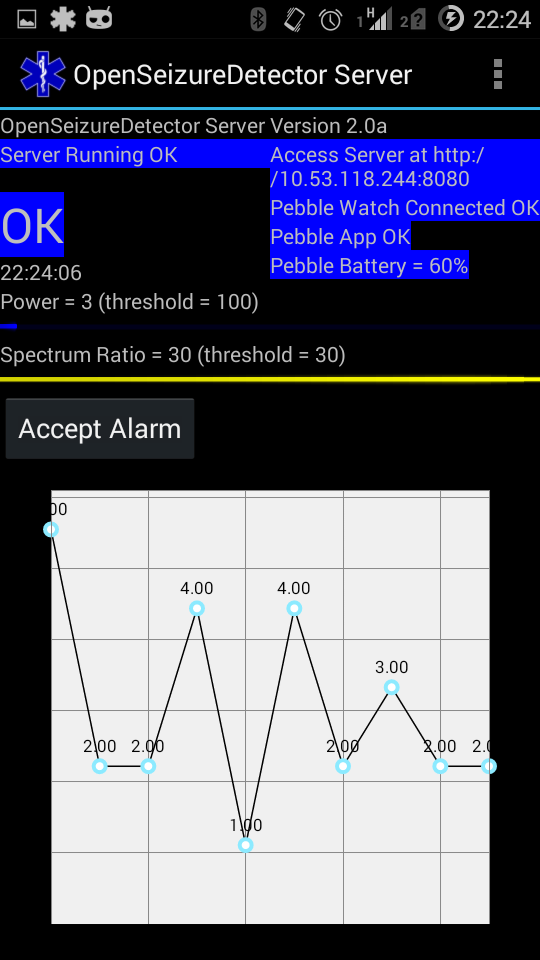
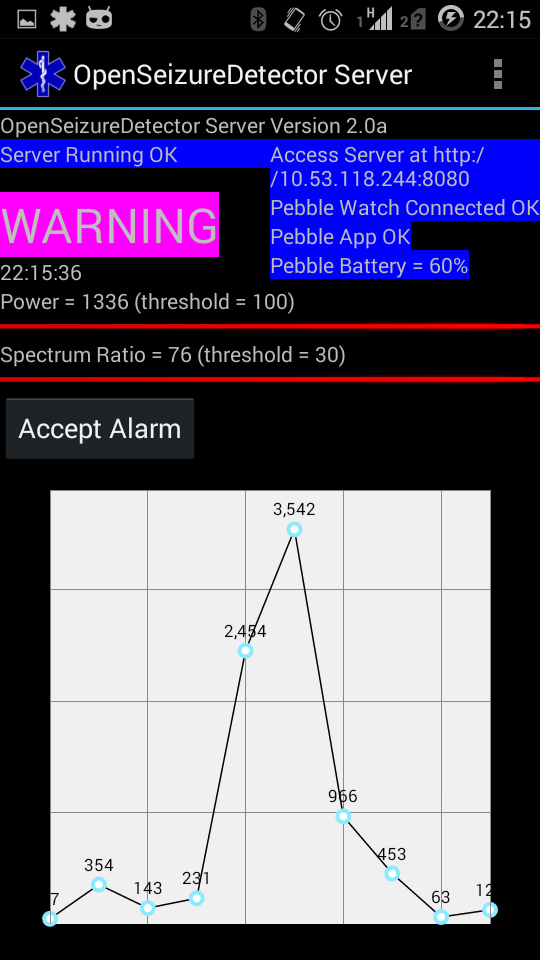
One change I am thinking of is to include some indicators to show how far the system is off alarming (at the moment I look at the graph on the display, but that is not easy to interpret).  The indicators are two horizontal bars which extend as either of the two seizure detection parameters increases – when both get to 100% (filling the screen), the system alarms – they change colour to show how close to the alarm level they are:

  • blue = ok,
  • yellow = close to alarm level,
  • red = exceeded alarm level)

(See the Seizure Detection Algorithm page for more details of how it works).

I wondered what users think of the idea – is it an improvement?  Would there be a better way of showing it (I am wondering about two semi circular lines that meet when the system is in an alarm state?), are the lines a bit too thin and dainty?  Does anyone look at the graph or should we scrap it and go for a much simpler user interface?

Screenshot_2015-11-24-22-15-23
Both Power and Spectrum Ratio OK
Screenshot_2015-11-24-22-24-09
Power OK but Spectrum Ratio very close to alarm level (ie we have movement in the right frequency range, but the movement is too small to alarm)
Screenshot_2015-11-24-22-15-38
Both power and spectrum ratio exceeding the alarm level (we have large movement in the correct frequency range)

Thoughts?   The source code for this version is in the new project github repository under the “v2.0” branch (https://github.com/OpenSeizureDetector/Android_Pebble_SD).


Graham (email graham@openseizuredetector.org.uk)

Splitting Git Repository

The OpenSeizureDetector git repository has become quite big, and contains several different applications.  This means it is difficult to use the GitHub issue tracking tools and commit logs to see what is happening with different apps.

So, I have split it by doing the following:

  1. Created an OpenSeizureDetector organisation on github.
  2. Transferred ownership of the OpenSeizureDetector repository to the new organisation.
  3. Checked out the repository to ~/OpenSeizureDetector, and created a new directory ~/OpenSeizureDetector_split then:
    1. Create a copy of the whole OpenSeizureDetector Repository
      cd ~/OpenSeizureDetector_split
      git clone ../OpenSeizureDetector
    2. Filter it down to just the required folder
      git filter-branch --prune-empty --subdirectory-filter pebble_version/Android_SD_Client_AS/ master
    3. Create a new repository under the OpenSeizureDetector organisation in Github (using the github web interface) (called for example Android_SD_Client.git)
    4. Copy our new trimmed down repository to a sensible folder name:
      cd ~/OpenSeizureDetector_Split
      git clone OpenSeizureDetector Android_SD_Client
    5. Point the new copy to the new github repository:
      cd Android_SD_Client
      git remote set-url origin https://github.com/OpenSeizureDetector/Android_SD_Client.git
    6. And finally push it up to github with
      git push

Seizure Detector Settings

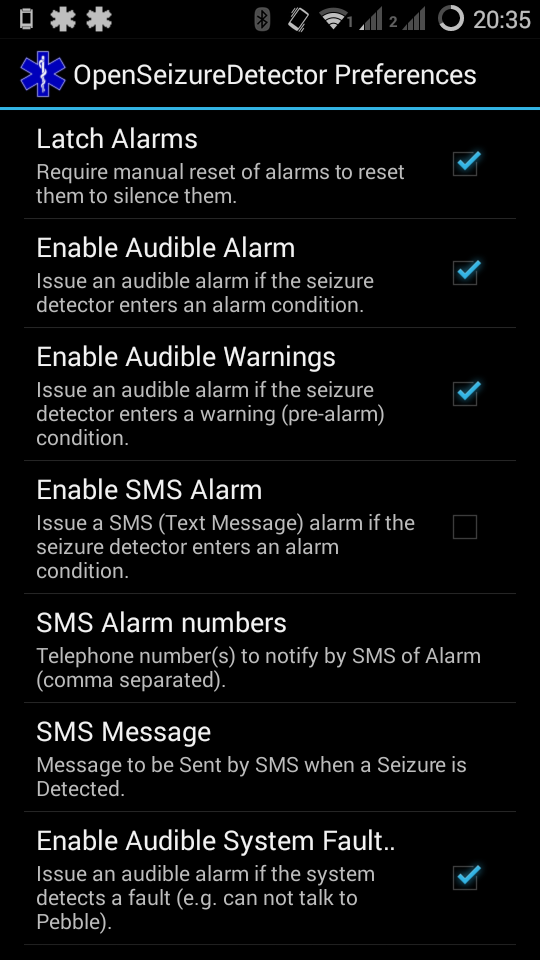
Screenshot_2015-11-12-20-35-40There are lots of settings that can be configured in the OpenSeizureDetector app now, both to tweak the seizure or fall detection algorithms, or adjust how the android app responds to alarms or faults.    The  Settings page lists all of the user-configurable settings in the latest version of the seizure detector app (v1.12).

Added Fall Detection Function

We have added a simple fall detection function to the OpenSeizureDetector app.   This means that the system will alarm if either the shaking associated with a tonic-clonic seizure is detected, or if a period of free-fall followed by large acceleration, which could indicate a person falling to the ground is detected.   See Seizure Detection Algorithm for more info.

The fall detection function is disabled by default and needs to be switched on using the Android app settings screen.

Please report any issues (or successes) with this new version (Android App and Pebble App).

Trouble with False Alarms

Benjamin has recovered well from his surgery (scoliosis correction) and is feeling quite his usual self again today after a good trip out to the football, with much bouncing around his bedroom sorting things (no sound on this video – imagine loud ‘Haaa’ sounds!).

This behaviour is really challenging to differentiate between this and a seizure using the simple algorithm we use in the pebble watch, so he keeps setting off his seizure detector alarm.   While it’s nice to know he is feeling better, the beeps get annoying and you start to ignore them if they go off too often, so I had to do something about it….

I have had a look at the alarm log and in all cases the spectral power in the 5-10Hz region of interest is well over the threshold level, but the ratio of the power in the region of interest to the whole spectrum is borderline – the ratio alarm level is set to 30 by default (=3.0 ratio) and he is generating a ratio of between 3 and 4.   This means that a relatively minor change to the ratio alarm level could solve the problem without compromising the detection capability.   I have increased the ratio threshold to 40 (=4.0 ratio).  At this level it just avoids going off with the sorting movements, but still alarms easily with a seizure-like shaking of the arm without other movement going on too.   Will test for a while and see how it goes.

I think I’ll write a page describing what the settings are and how to tune them in case other people have trouble….

[Note, I think I had done this before (but maybe not increased the ratio threshold as far as 4.0), but re-installed the app and lost my settings – should have written them down!].

Compatibility with Pebble Time and Pebble Round

A user has reported problems trying to use OpenSeizureDetector with a Pebble Time watch.

I have re-compiled the watch app using the latest Pebble tools which should have made it compatible with Pebble Time and Pebble Round watches as well as the original Pebble.   This new version is published on the Pebble App Store as Version 1.2.

This version continues to work normally on an original Pebble, but should also run on one of the newer designs.  Note that I have not tested it on a Pebble Time or Pebble Round though, only an emulator, so please feed back any experience with it on these devices!

No changes to the Android app were required.

Please let me know if you encounter any problems after this change, and I can revert back to the previous version.

Graham (graham@openseizuredetector.org.uk)

Android Version of ‘BenTV’ Camera Viewer

Before we had the pebble watch seizure detector, I had set up a video camera system in the house so we could keep an eye on Benjamin to see he is ok when he is up in his bedroom (he is autistic so likes to lock himself in there and doesn’t like visitors!).  The current system uses a WansView network (IP) camera and some Raspberry Pi based monitors in the living room, dining room etc. to see and hear what is happening.

I have always liked the idea of having a mobile phone or tablet computer version of the monitor that we can take with us if we are in a different room, the garage, garden etc.  I have had a couple of attempts at writing it, and always failed, so have been doing more investigations to see what is wrong.

There is a minimalist Android app on the OpenSeizureDetector Github repository which will open an RTSP stream from the camera and display it on screen with audio, using the Android MediaPlayer library which is part of the Android system.

The problem is that I kept getting an error:

E/MediaPlayer: Error (1,-2147483648)

which is not awfully helpful – error 1 means ‘Unspecified MediaPlayer Error‘, and all I got was a blank screen.

I tried all sorts of combinations of RTSP url’s and authentication methods, and different video stream sizes and bit rates, in the hope that that would help.   See the Troubleshooting_log.txt file in the repository.  Nothing Did – always got error 1 and a blank screen….

Then I remembered that I have an old Y-Cam Knight video camera in the attic.  I set that up and pointed the app at its rtsp video stream (rtsp://guest:guest@192.168.1.18/live_mpeg4.sdp)…and I got video and audio – success!

Rapidly decided to scrap Wansview camera and buy another Y-Cam one…But Y-Cam don’t do IP Cameras any more, just ‘Cloud Cameras’ which are apparently different and only transmit when they detect movement, which is no use for me….

So at least I know it is not my software, it is something to do with the wansview camera.   As a fall back I have ordered a D-Link camera, which I have seen reports of working from someone called Josh Smith, and on which I based my minimalist test app.

But that would be giving up, so I’d like to understand what is wrong with the stream from the wansview camera.

From my experiments, Error 1 could come from an RTSP authentication fault, but I don’t think that is it, because the same URL works with openRTSP from my laptop.   So another possibility is a audio/video format issue.   You can use openRTSP to download the raw audio and video streams separately –

openRTSP "rtsp://guest:guest@192.168.1.25/12"

This yields a video-H264-1 and an audio-PCMA-2 file.   You can now use ffmpeg to create a .mp4 container containing either the video file alone or the video and audio combined.

Just video file:

ffmpeg -f h264 -i video-H264-1 -vcodec copy wansview_video.mp4

openRTSP can create a combined audio/video one during the download with:

openRTSP -4 "rtsp://guest:guest@192.168.1.25/12" > audio_video.mp4

But the resulting file crashes mplayer and gives an “unknown error” in vlc.  So I suspect it might be the audio format that is giving the trouble – the ycam camera used amr audio format, not pcma.

A quick check confirmed that the wansview_video.mp4 file plays ok when copied into the res/raw folder of the app and the software modified to play that, rather than the RTSP stream.   So, I think that Android is playing the h264 video ok (which it should according to the Supported Media Formats page.   The problem is probably an issue with the PCMA audio format – PCM is supported, but this must be different to PCMA…

This means that I am not going to be able to write a nice simple App to play the audio and video using the provided Android MediaPlayer library – if I want it, I will have to be cleverer to deal with the audio.  I think the options are:

  • Write it all from scratch (major undertaking!)
  • Use the ffmpeg library that has been ported to Android
  • Use the Gstreamer library that has been ported to Android

I am a bit suspicious about trying to use ffmpeg, as this didn’t seem to like the PCMA on my laptop (although dolphin player, which is based on ffmpeg plays the openRTSP created .mp4 file ok), so maybe Gstreamer is the way to go.   There is an Open Source RTSP viewer available that is based on gstreamer (rtspviewer), or possibly (rtspplayer).

So I’m going to have to learn a bit more about native apps on Android – I had hoped that making a video player would be trivial!

 

Fixed Problem with Google Play Listing

Michael Long has reported a problem with the Pebble Seizure Detector Server App which is that if you have a device that does not have mobile telephony capability, the seizure detector app does not appear in the Google Play store listing for the device.   This is because the app has the capability of sending SMS alarms, but this feature will not work if the device does not have a mobile phone included.

I have just uploaded an update to the app, which makes telphony optional, which should fix this and allow the app to be installed on tablet computers etc. that do not include mobile phones.   This should appear in Play store in a few hours time.  I don’t know how to test if this minor change has fixed the problem or not though, so there may be another attempt later….

For those who struggle to install it through Play Store, I have included the compiled version of the app in the Github Repository so you can download it from there and follow Mike’s instructions for installing it.

Thanks for reporting this, Mike!

EpilepSEE – Mike Long’s Videos

Screenshot from 2015-08-09 13:24:05

Mike Long from epilepSEE has posted some very helpful videos on his Facebook page, which demonstrate how to set up and install the seizure detector on the Pebble Watch and Android. You can see his videos below and can reach his Facebook Page by clicking on the logo above.

Introduction

[fbvideo link=”https://www.facebook.com/epilepSEE/videos/vb.1611694032385073/1691878884366587/?type=2&theater” width=”500″ height=”400″ onlyvideo=”1″]

Getting a Phone

[fbvideo link=”https://www.facebook.com/epilepSEE/videos/vb.1611694032385073/1693138984240577/?type=2&theater” width=”500″ height=”400″ onlyvideo=”1″]

Installing Pebble Software

[fbvideo link=”https://www.facebook.com/epilepSEE/videos/vb.1611694032385073/1693139237573885/?type=2&theater” width=”500″ height=”400″ onlyvideo=”1″]

Installing OpenSeizureDetector

[fbvideo link=”https://www.facebook.com/epilepSEE/videos/vb.1611694032385073/1693139760907166/?type=2&theater” width=”500″ height=”400″ onlyvideo=”1″]

A Slight Problem

[fbvideo link=”https://www.facebook.com/epilepSEE/videos/vb.1611694032385073/1693140050907137/?type=2&theater” width=”500″ height=”400″ onlyvideo=”1″]

Completion of Pebble and Android Software Installation + How it Works

[fbvideo link=”https://www.facebook.com/epilepSEE/videos/vb.1611694032385073/1693140290907113/?type=2&theater” width=”500″ height=”400″ onlyvideo=”1″]

[fbvideo link=”https://www.facebook.com/epilepSEE/videos/vb.1611694032385073/1693350354219440/?type=2&theater” width=”500″ height=”400″ onlyvideo=”1″]