Thank you to everyone who has been contributing data to our ‘Data Sharing’ programme, we can now release V1.11 of the Open Seizure Database.
This version contains significantly more seizure events than previously, mostly due to the contribution of a new user who is having a particularly difficult time at the moment, but is contributing their data to help us improve OpenSeizureDetector – thank you user 1643!.
This is the version of the database that I will be using to train an updated version of the Machine Learning (“AI”) detection algorithm in OpenSeizureDetector – I will post a separate update on the performance of that model when I release it for testing.
Thank you again to everyone who is contributing data to our Data Sharing Programme – we would not be able to develop the Machine Learning algorithm without your contributions.
If you are interested in working with the data, please get in touch and I will give you access to it, subject to our data licence.
Version 5.0.9 of the OpenSeizureDetector Android App is now available for installation on Google Play Store. This is a minor bug-fix release which addresses issues with the required permissions not always being requested for sending SMS alarm messages, and ensuring that the app re-starts automatically if you select a different PineTime Watch (BLE device). If there are any issues, please report them to graham@openseizuredetector.org.uk, or on our project bug tracker.
Anyone who is registered as a Beta Tester for the OpenSeizureDetector Android App should receive an update to V5.0.9. This is a small bug-fix update to address an issue with SMS permissions not being requested correctly (leading to ‘Failed to Send SMS’ errors unless you grant the permissions manually), and an issue where the app did not re-start automatically if you switched between Bluetooth Devices (such as different PineTime watches).
I will give it a few days to see if Beta Testers discover any major issues introduced by these changes, then make it available to all users later in the week.
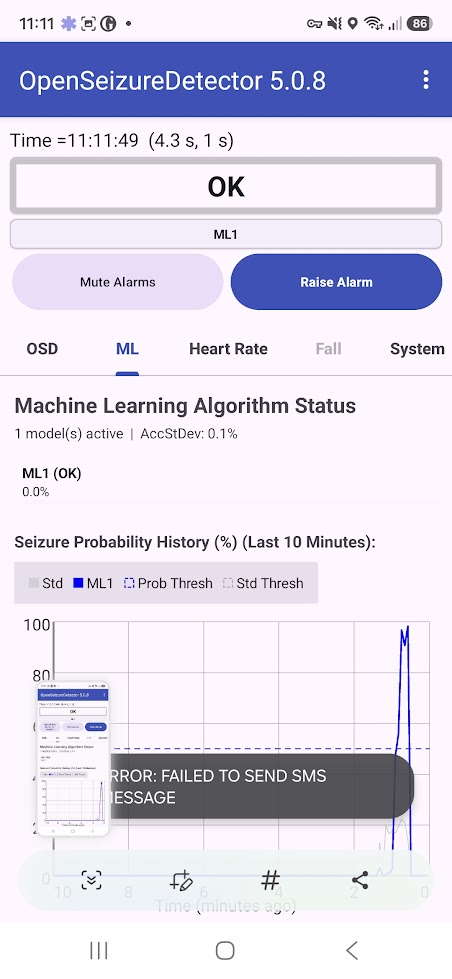
A user has identified a problem with SMS alerts not sending on a Motorola phone – I have tested it and it is also failing on a Samsung A17, so is probably related to permissions on newer versions of Android. I saw the issue when I used the ‘Test SMS Alarm Notification” menu item in the main app screen – you see a popup saying “ERROR – FAILED TO SEND SMS MESSAGE”.
I will aim to do a fix and publish it over the next couple of days.
In the meantime, if you need to use SMS alerts, you can work around the problem by granting ‘Phone’ and ‘SMS’ permissions in the main phone settings screens:
Go into the main phone settings menu, then select Apps, then OpenSeizureDetector. This will give you the phone level settings for the apps – one of which is Permissions.
Click on Permissions and it will show you which permissions are allowed and Not allowed.
Enable Phone and SMS permission from the list.
Once you have done that, SMS alerts should work again in V5.0.8 so no need to downgrade to get SMS alerts working again.
We are pleased to (finally!) release the new Version 5 of the OpenSeizureDetector Android App – it should be on Google Play Store shortly.
There are several major changes in this version:
The ability to download Machine Learning (“AI”) models that we are making with the data provided by users via our ‘Data Sharing’ programme.
A first-use setup “Wizard” to guide new users through setting up the system for the first time (using either a PineTime or Garmin watch)
A simpler user interface – it defaults to a “Basic Mode” with no graphs, just a simple OK/ALARM status and Raise/Mute alarms buttons. You can disable Basic Mode in the General Settings page to get something that looks more like the current version.
A lot of ‘behind the scenes’ improvements to improve the stability of the system and make it easier to maintain in the future.
To simplify the user interface, it only lists PineTime, Garmin, Network and Phone data sources by default. If you want to select one of the more ‘experimental’ data sources, there is a ‘Developer Mode’ that can be enabled in the settings.
The Machine Learning model that the system recommends during installation is the ‘Run24’ one that I made in January and have been testing since. I am very pleased with its performance for or son, with it having >90% detection reliability. When I analyse the recently provided data from users, I am seeing just over 80% reliability, so it is comparable to the existing algorithm with ‘flap’ detection – but it should give fewer false alarms. Note though that it does still false alarm for doing things like using hand tools and travelling in a vehicle. Once the release of this version of the Android App has settled down, I will get back to working on a better model and making that available to users.
Thank you to everyone who has taken part in the beta testing of this app – you have found issues and made some very helpful suggestions to improve it.
When you find issues with this version, please report them via our bug tracker, or email graham@openseizuredetector.org.uk.
Apologies to the beta testers, but the ‘final’ test version that I published last night (V5.0.7) is partially broken – The Basic Mode user interface works, but the Advanced Mode crashes because of an issue with the graph drawing library.
I would suggest not upgrading if you haven’t done so yet.
If you see the issue, you get a crash when in advanced mode. To get it working again:
Do a ‘Force Stop’ (or re-boot the phone) to make sure OpenSeizureDetector is properly shutdown.
Start OpenSeizureDetector
As soon as the start-up screen appears, press the ‘Edit Settings’ button to bring up the settings screen.
Go to General -> Basic Mode and enable the Basic Mode checkbox.
Then when you exit the settings screen, the system will re-start into Basic Mode and should work correctly.
I’ll look into what caused this and issue a new ‘final’ test version later this evening.
I have updated the web site at https://openseizuredetector.org.uk to try to make it simpler for new users to find information. There are is a new home page that links to installation instructions, a user guide page for existing users and a developers page. I’m afraid the developers section is still very sparse – detail to follow.
The old web site pages are still there, so if you see something that is missing, please let me know and I’ll move it across.
Please contact graham@openseizuredetector.org.uk with any comments or suggestions.
My name is Jannie, and I am currently working on a graduation project focused on improving the design and user experience of the Open Seizure Detector app.
To better understand real user experiences, I am looking to speak with current users of Open Seizure Detector. This could be through a short online interview or chat. Depending on what you are comfortable with.
Topics may include:
first-time setup
daily use of the app
notifications and alerts
trust and reliability
features that work well or could be improved
The project is purely educational and focused on improving the app experience for users.
If you would be interested in participating or sharing your experiences, please feel free to contact me at:
Is anyone using a Garmin Forerunner 55 with OpenSeizureDetector? A user has reported a strange behaviour where the first time they used it, it worked correctly, but since then it has only been sending data every 20 seconds rather than every 5 seconds. (https://github.com/OpenSeizureDetector/Garmin_SD/issues/82)
If you are using a Forerunner 55, please will you send me a log file off the watch? (you need to put an empty text file in GARMIN/APPS/LOGS called GarminSD.txt, then run the app for a couple of minutes, then when you re-connect the watch to the computer, GarminSD.txt, and possibly GarminSD.bak will contain data that we can analyse).